Plan and billing
A subscription belongs to the organisation, never to a person: each organisation has its plan, and everything that happens in its projects (number of projects and members, features available) depends on that plan. The same user can therefore work in a Business organisation and in another on the Free plan.
- Who it is for: only an organisation’s Owner chooses, changes or cancels its subscription; other members can compare plans.
- Where: Organizations › (your organisation) › Billing tab; the user menu (bottom of the sidebar) › Abonnement; or a click on a locked entry.
The plans
Section titled “The plans”| Free | Team | Pro | Business | |
|---|---|---|---|---|
| For | To get started | Vulnerability watch for teams | Watch + NIS2 evidence | SSO, audit, procurement |
| Price excl. VAT | €0 | €49 / month or €490 / year | €99 / month or €990 / year | from €249 / month or €2,490 / year |
| Projects | 1 | 5 | Unlimited | Unlimited |
| Organisation members | 1 | 10 | Unlimited | Unlimited |
| Stack items | 10 | 200 | Unlimited | Unlimited |
| Monitored URLs | 3 | 25 | 100 | Unlimited |
| End-of-life subscriptions | 5 | 50 | Unlimited | Unlimited |
| Webhooks per project (Slack, Teams, signed webhooks) | — | 5 | Unlimited | Unlimited |
| Report history | — | 12 months | 36 months | Unlimited |
| API calls per hour | — | — | 5,000 | Unlimited |
| Audit log retention | 30 days | 90 days | 1 year | 5 years |
| AI tokens per month | 50,000 | 1,000,000 | 2,500,000 | 10,000,000 |
| CVE search, alerts, stack, end of life, articles, AI assistant | ✓ | ✓ | ✓ | ✓ |
| Organisations, groups and roles | — | ✓ | ✓ | ✓ |
| Case management (and tickets), report export | — | ✓ | ✓ | ✓ |
| Frameworks: Coverage, Settings › Frameworks, labels, management report | — | — | ✓ | ✓ |
| Frameworks you can follow: NIS2, ISO 27001, CIS Controls v8, ANSSI | — | — | ✓ | ✓ |
| Incident and Supplier registers | — | — | ✓ | ✓ |
| Evidence pack (advice log, insurer questionnaire) | — | ✓ | ✓ | ✓ |
| Schedule, Exceptions and By remediation action views, network scanner import | ✓ | ✓ | ✓ | ✓ |
| Inventory connectors (GLPI, Intune) | — | — | ✓ | ✓ |
| API access | — | — | ✓ | ✓ |
| AI-built workflows | — | — | ✓ | ✓ |
| Audit log (viewing) | — | — | ✓ | ✓ |
| SSO / OIDC | — | — | — | ✓ |
Emails sent by workflows are not capped on any plan. Prices are those shown in the subscription window; the yearly cycle carries a “-17%” badge. Business shows a starting price: beyond it (volume, purchasing terms), the plan is priced on quote, and it can be paid by purchase order (write to us).
The “Choose a subscription” window
Section titled “The “Choose a subscription” window”It compares plans and lets you subscribe or change plan, for one organisation at a time.
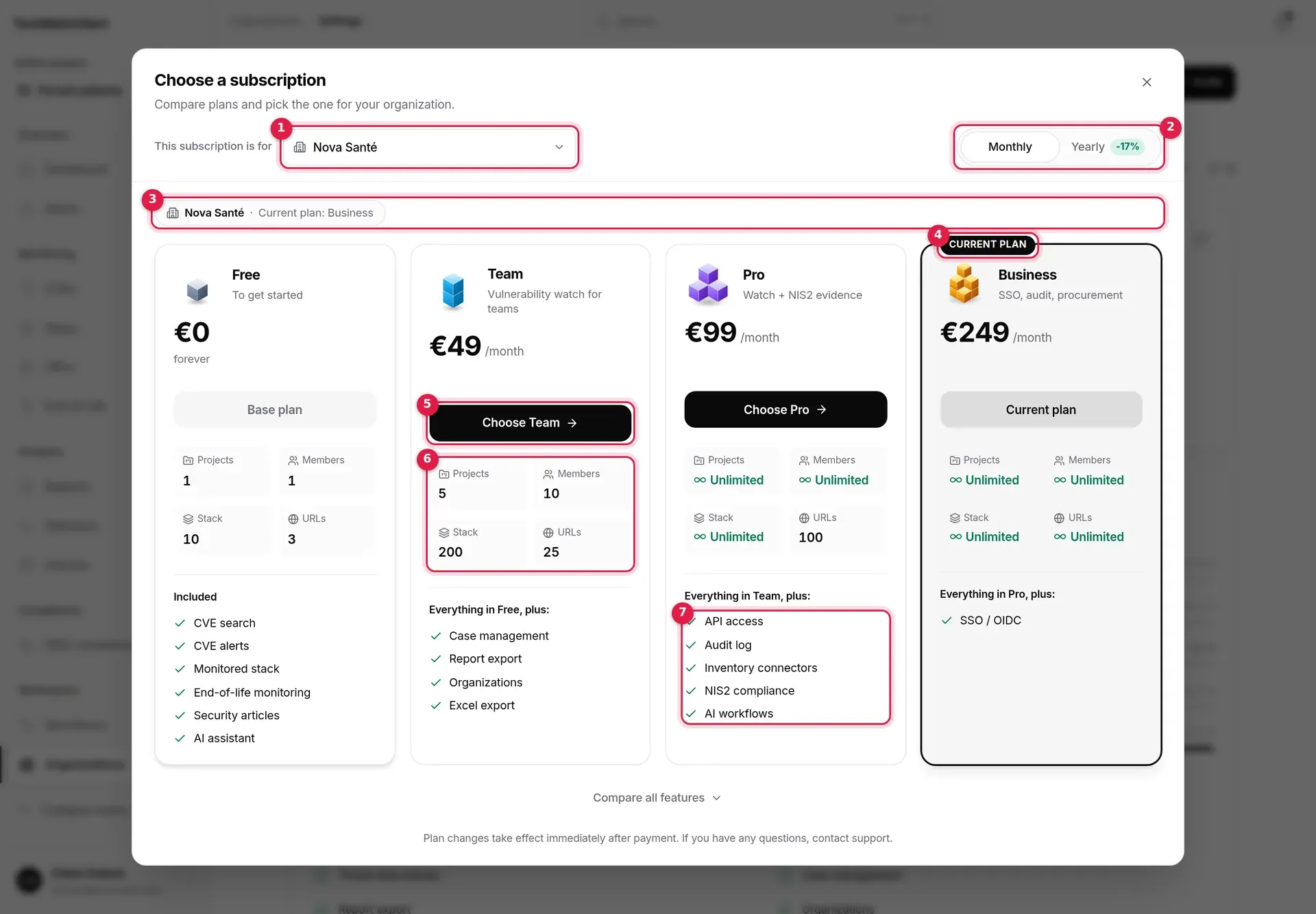
- This subscription is for: the organisation concerned. The window starts from the organisation you opened it from, otherwise from the active project’s organisation.
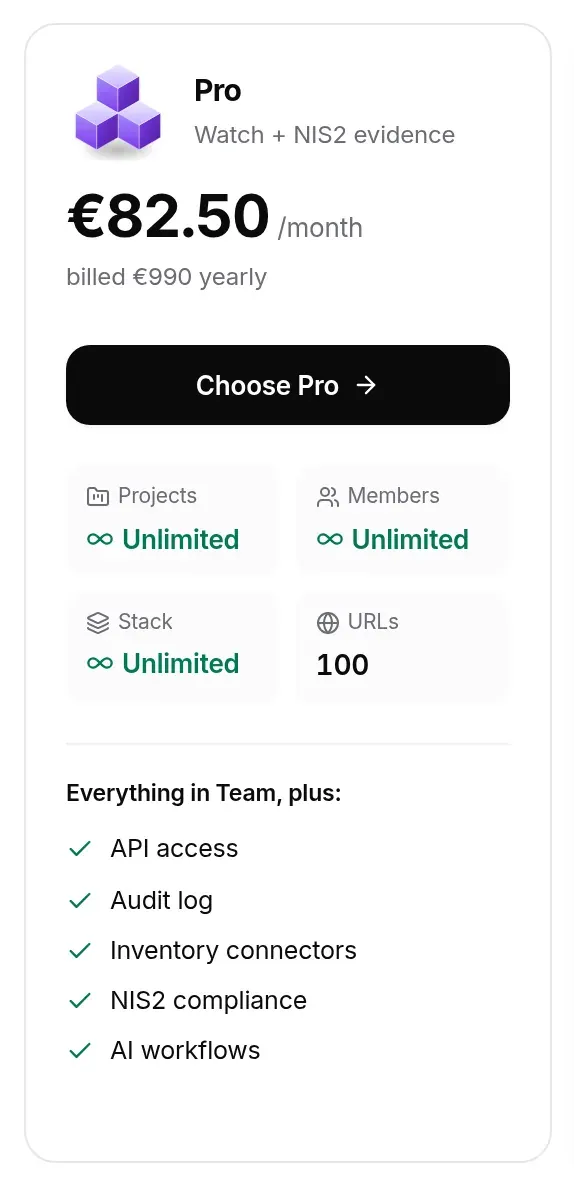
- Monthly / Yearly: the billing cycle. On yearly, the price is still shown per month, with the yearly total below.
- The organisation’s situation: its current plan, and a message depending on the case (see below).
- Current plan: the card of the current plan.
- Choose Team: each plan’s action button.
- The four key limits: projects, members, stack, URLs (“Unlimited” when there is no cap).
- What the plan adds to the previous one (“Everything in Team, plus:”).
The organisation selector lists all your organisations with your role: Owner, or Read only if you cannot change the subscription there. The active project note marks the organisation of the open project.

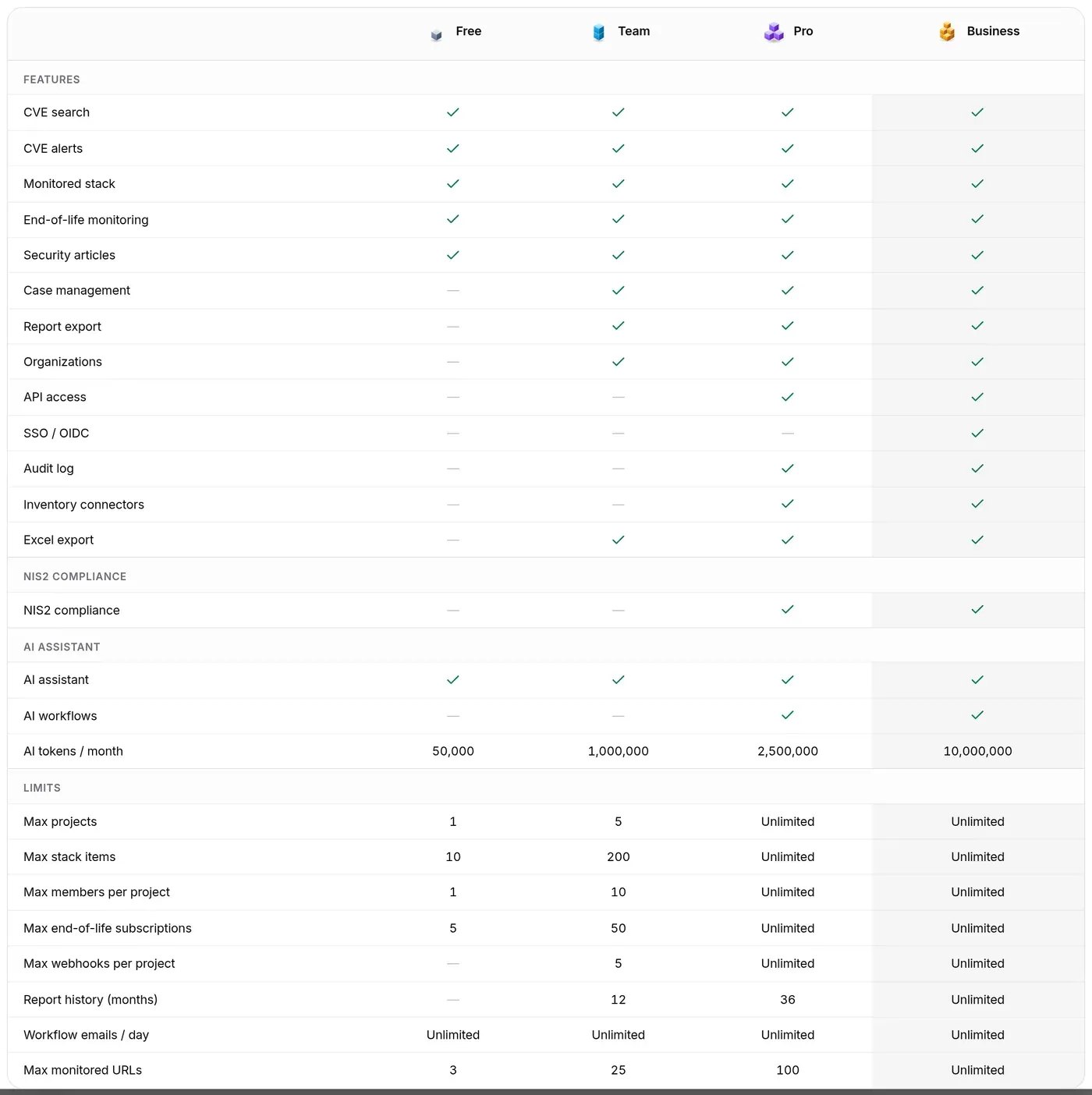
Compare all features expands a full table with plans in columns; the current plan’s column is tinted. Feature names in this table and on the cards follow the interface language.
What each card’s button says
Section titled “What each card’s button says”| Label | When | Effect |
|---|---|---|
| Current plan | The current plan | None |
| Choose (plan) | Owner, organisation without a paid subscription | Opens Paddle checkout |
| Switch to (plan) | Owner, organisation already subscribed | Asks for confirmation, then changes plan |
| Base plan | Free card, organisation without a paid subscription | None |
| Through cancellation | Free card, subscribed organisation | Leads to the Billing tab, to cancel |
| Owner only | You are not the Owner | None; a banner says so |
| Unavailable | The plan has no price for this cycle | None |
When the organisation is managed by a partner, a banner says the partner pays for its subscription: there is nothing to pay here.
Subscribing (payment through Paddle)
Section titled “Subscribing (payment through Paddle)”- Open the window from the right organisation and check the This subscription is for field.
- Choose Monthly or Yearly.
- Click Choose (plan): the window closes and the secure checkout of Paddle, our payment provider, opens over the app, with your email address pre-filled.
- Pay in that form. The plan is applied to the organisation as soon as Paddle confirms the payment.
If the payment module fails to load, a message says so and nothing is charged.
Changing plan
Section titled “Changing plan”For an organisation that is already subscribed, Switch to (plan) shows a confirmation bar “Switch from X to Y?”. Confirm change modifies the existing subscription: the change applies right away, prorated on the current subscription, with no second payment. It is refused while a cancellation is scheduled: resume the subscription first.
To go back to the free plan, you cancel (see below).
The Billing tab
Section titled “The Billing tab”Reserved for the organisation’s Owner.
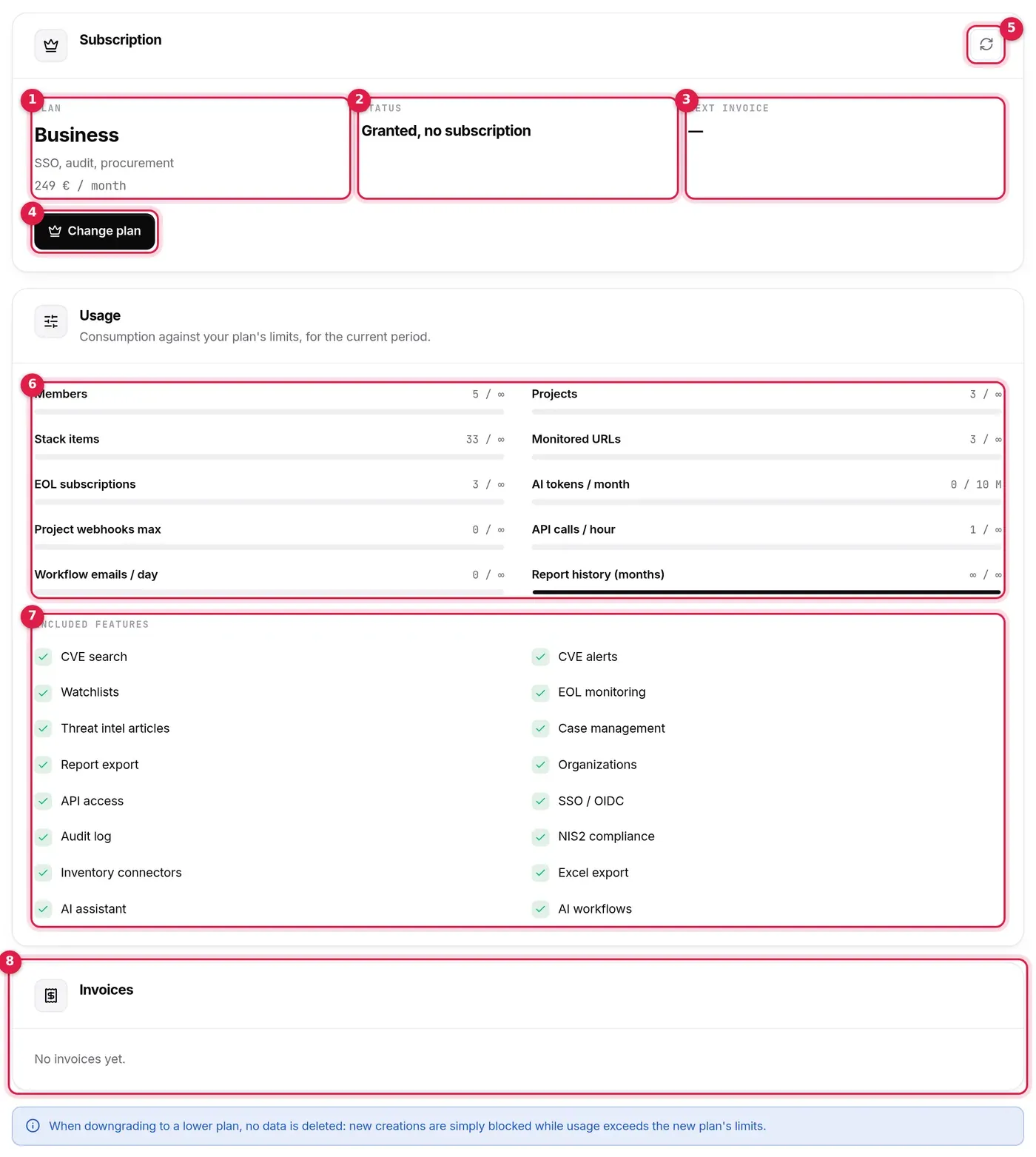
- Plan: the organisation’s effective plan.
- Status: Active, Trial, Past due, Paused, Canceled, Expires at end of period; with no Paddle subscription, “Free” for the free plan, and Granted, no subscription for a paid plan granted without payment.
- Next invoice, or Active until after a cancellation, or Trial end during a trial.
- Choose a subscription (free plan or trial) or Change plan: opens the subscription window. On the right, See usage leads to the Usage page.
- Refresh (top right of the section): reloads the state from Paddle.
- Usage (its own page, also readable by Admins): consumption against each plan limit (members, projects, stack items, monitored URLs, end-of-life subscriptions, AI tokens this month, webhooks, API calls per hour, workflow emails today, report history), as gauges that turn amber at 70% and red at 90%. “∞” means unlimited. Members of a partner’s team, who come in without an invitation, do not take up a seat; API calls are counted for the whole organisation, all keys together.
- Included features (Usage page): a green tick for what the plan opens, a dash for the rest.
- Invoices: a table (one card per invoice on a phone) with the plan, number, date, amount and a PDF button; the ⋯ menu and a right-click on an invoice offer Copy number (and, on right-click, Open the invoice (PDF)).
Cancelling, resuming
Section titled “Cancelling, resuming”- On the Plan and billing page, click Cancel subscription (shown for an active, trialing or past-due subscription).
- Confirm in the window that opens (it says until when the subscription stays active): Yes, cancel.
Cancellation takes effect at the end of the paid period, never immediately: the status becomes Expires at end of period and the Active until date appears. While the period runs, Resume subscription cancels the cancellation. Both are recorded in the audit log. Deleting the organisation, on the other hand, cancels the Paddle subscription immediately, before anything is deleted (see Organisations, Danger tab).
Locked entries and tabs
Section titled “Locked entries and tabs”What the organisation’s plan does not open stays visible but locked. The plan that counts is that of the active project’s organisation.
In the sidebar
Section titled “In the sidebar”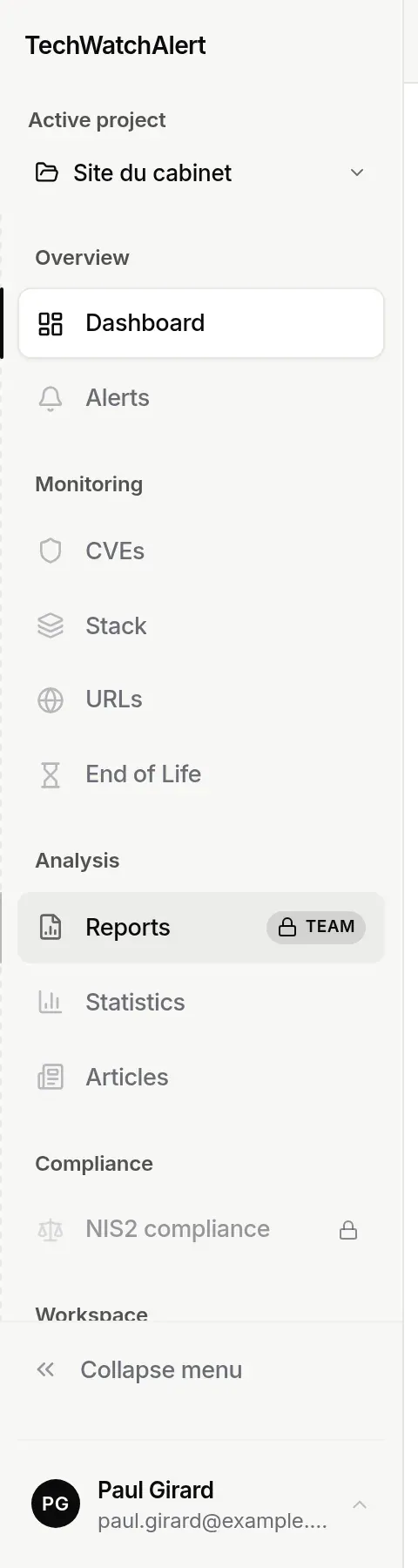
A locked entry is greyed out and carries a padlock; on hover, the padlock opens onto the name of the plan that unlocks it (“Included from the Team plan”). A click does not open the page: it opens the subscription window, highlighting the recommended plan.
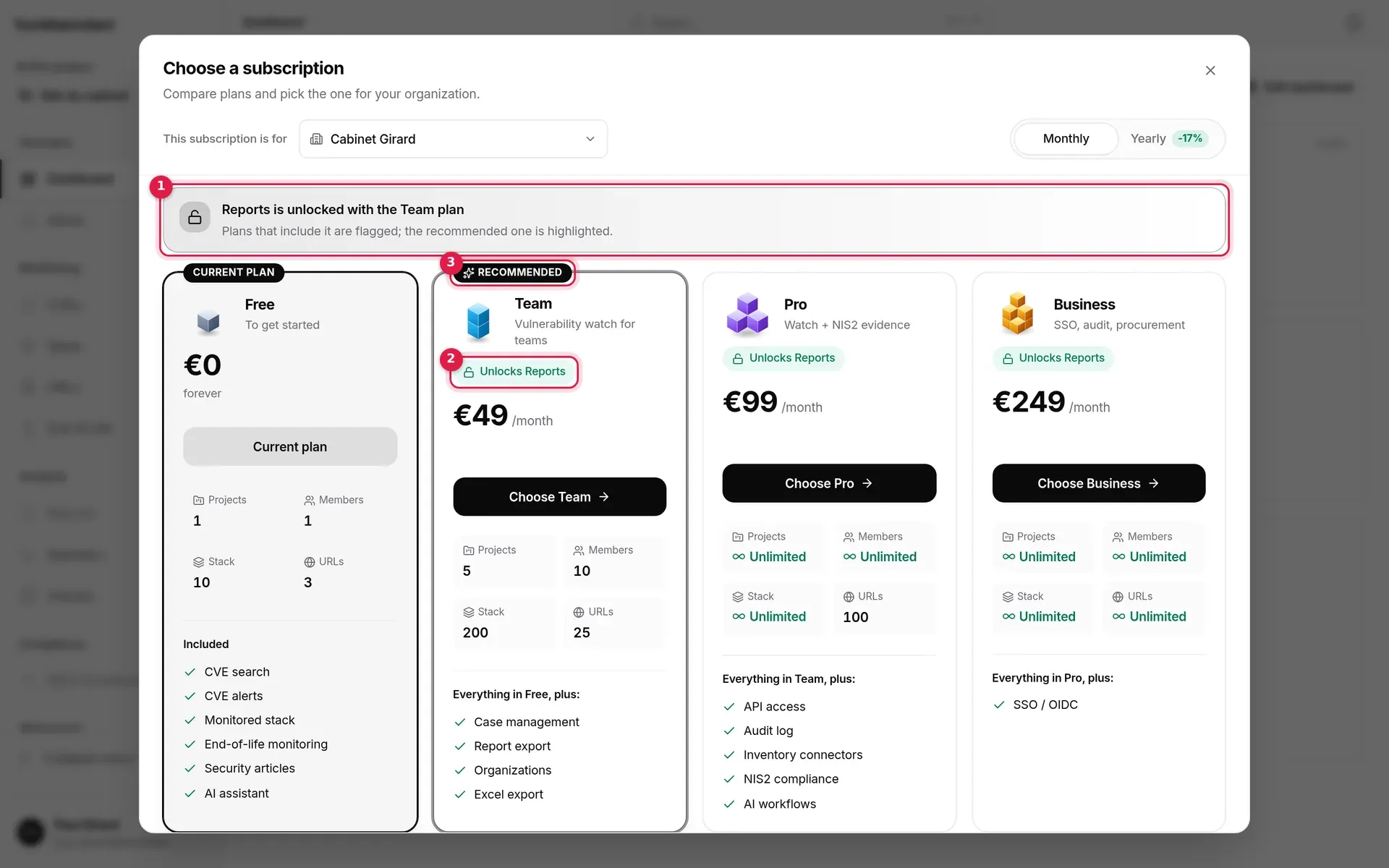
- The banner recalls what you wanted to open and the plan that includes it.
- Unlocks (module): on every plan that includes it.
- Recommended: the first paid plan that includes it.
The entries concerned are Alerts, CVEs, Stack, URLs, End of Life, Reports, Articles, Schedule, Incidents, Suppliers and Frameworks, each tied to its own plan feature. With the current plans, Reports is locked on Free; Frameworks, Incidents and Suppliers on Free and Team (for those who can change the plan: organisation Owner or Admin; other members do not see these entries).
If you land on a locked page from a bookmark or a link, the page presents what it would bring, the plan that opens it and an Upgrade to (plan) button; Back to dashboard leaves it. The Reports page has its own offer screen (see Reports).
Available depending on your plan: pages, views and items
Section titled “Available depending on your plan: pages, views and items”Since October 2026, each page and feature that came out of the former NIS2 area is set separately, plan by plan. What your plan does not include carries a padlock; choosing it opens the subscription window, whose banner says what the feature brings and which plan opens it.
| Where | What is locked outside the plan |
|---|---|
| Sidebar (desktop, mobile drawer, tab bar) | Schedule, Incidents, Suppliers, Frameworks |
| Alerts page | The Exceptions and By remediation action toggles; reached by address (?vue=exceptions, ?vue=gestes), the view’s offer page |
| Settings › Frameworks | The page carries a padlock outside the plan; each framework not included (NIS2, ISO 27001, CIS, ANSSI) shows “Included from the (plan) plan” instead of its switch |
| Coverage | Frameworks not included appear next to the selector, with a padlock and the plan that opens them; they are left out of coverage, labels and the report |
| Reports › New report | The evidence pack templates (advice log, insurer questionnaire) |
| Project › Scans | Importing Nessus, Greenbone/OpenVAS, Qualys and InsightVM reports: a banner says so, and dropping such a file shows a clear message. Trivy, Grype and CycloneDX reports can still be imported |
A framework the organisation followed before changing plan stays selected: it comes back with the plan that includes it. Nothing is deleted.
In settings
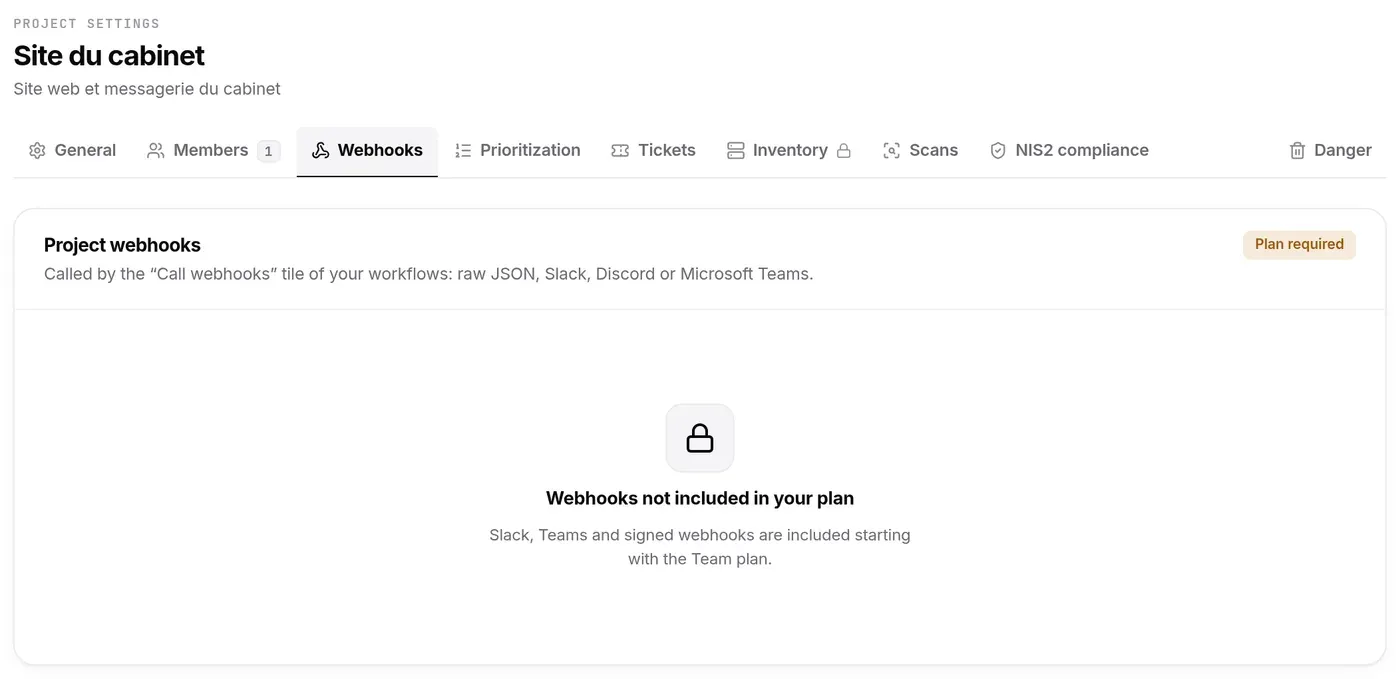
Section titled “In settings”- Project webhooks: without webhooks in the plan, the tab shows Webhooks not included in your plan and the Plan required badge.
- Tickets: without case management, the tab shows Included with case management.
- Inventory (project settings): outside the Pro and Business plans, the tab shows “Inventory connectors unlock with the Pro plan”.
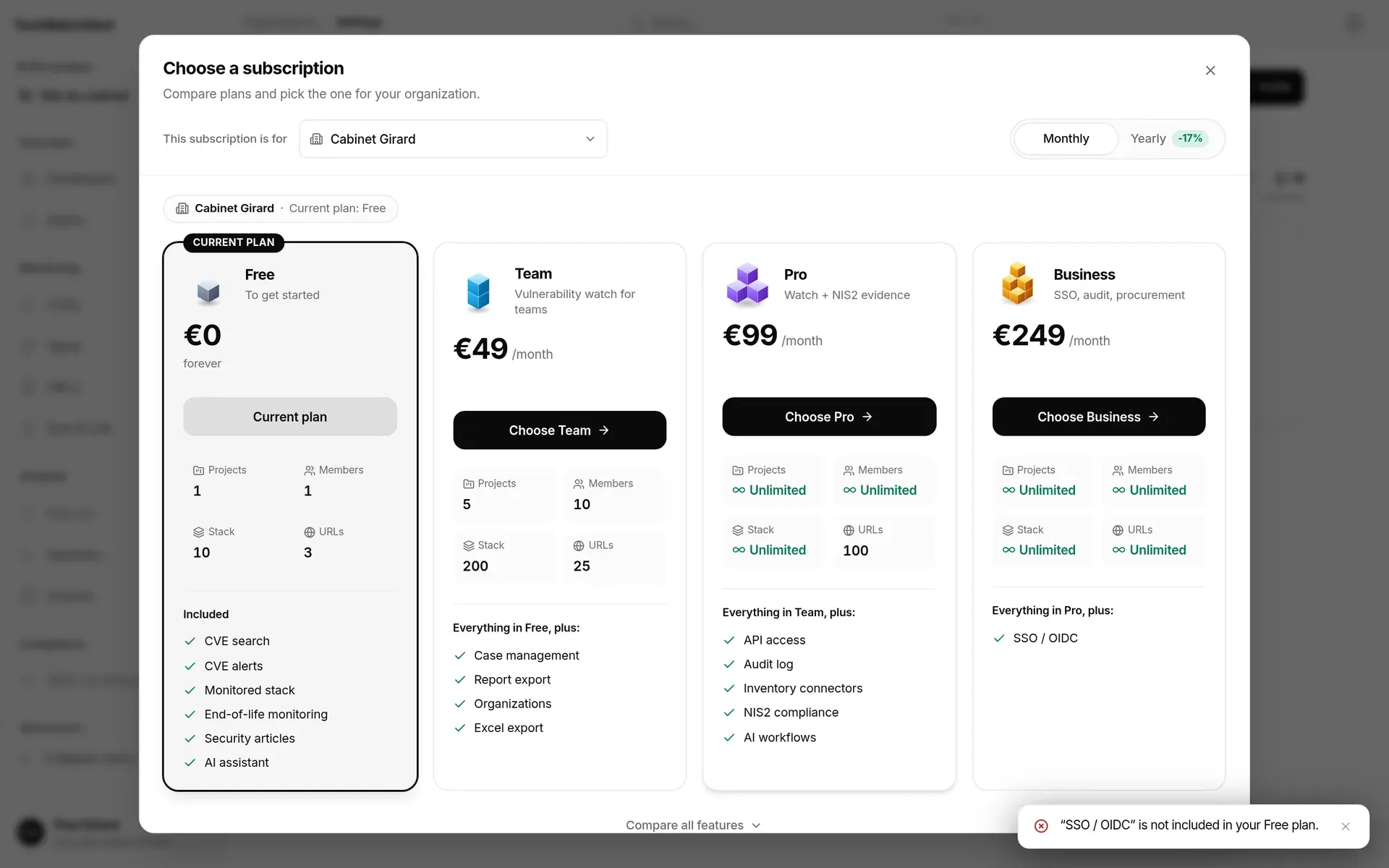
- SSO and Audit log: SSO needs the Business plan, the audit log the Pro or Business plan. Otherwise the tab shows a locked screen (SSO unavailable on your plan, Audit log unavailable on your plan) with the reason for the refusal (““SSO / OIDC” is not included in your Free plan.”).


When a limit is reached
Section titled “When a limit is reached”When the server refuses an action because the plan does not include it or a limit has been reached (one project too many, one member too many…), a message explains why. If you are the Owner of the active project’s organisation, the subscription window opens at the same time; otherwise the message asks you to get the Owner to upgrade.
Who can do what
Section titled “Who can do what”| Action | Member or Admin | Owner |
|---|---|---|
| Open the subscription window and compare plans | ✓ | ✓ |
| Subscribe, change plan | — | ✓ |
| Billing tab, invoices, cancellation, resumption | — | ✓ |
Frequently asked questions
Section titled “Frequently asked questions”I have paid but the plan has not changed. The plan applies once Paddle confirms the payment. Click Refresh in the Billing tab after a few moments.
I want to pay yearly. Choose Yearly at the top of the window before clicking the plan.
I am an Admin: why “Owner only”? Only the organisation’s Owner manages its subscription; Admins can compare plans but cannot subscribe.
What happens to my data if I go back to Free? Nothing is deleted; beyond the new limits, creations are blocked.