Organisation
Your workspace: a company, a team, a client. It holds the subscription (the plan), the members and their roles, groups, the CVE prioritisation policy, SSO and API keys. An account can belong to several organisations.
TechWatchAlert is a vulnerability monitoring platform. You tell it what you run (web servers, databases, libraries, desktop software, public-facing sites); it continuously watches published vulnerabilities (CVEs), exploitation signals, end-of-support dates and certificates, and warns you only when something affects you. You then follow each vulnerability through to its fix, automate the response, produce reports and, if the directive applies to you, support your NIS2 obligations.
This guide describes the application screen by screen, with annotated screenshots. This page is the map: the concepts, how they fit together, the typical journey and the table of contents.
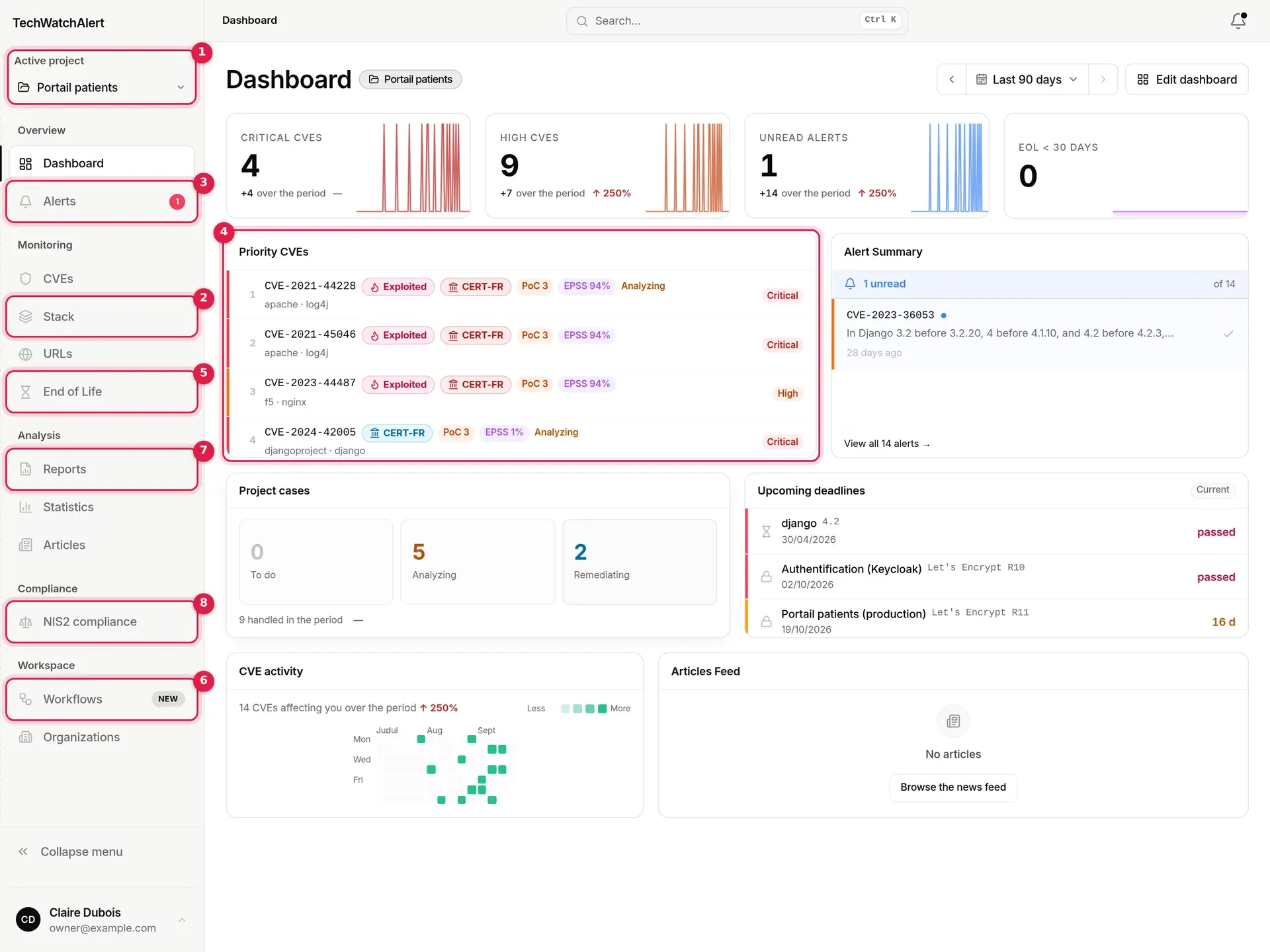
For every part of the screen, see Finding your way around.
Organisation
Your workspace: a company, a team, a client. It holds the subscription (the plan), the members and their roles, groups, the CVE prioritisation policy, SSO and API keys. An account can belong to several organisations.
Project
A monitored scope within an organisation: an application, a website, a fleet of machines. Each project has its own stack, URLs, tracked end-of-life dates, alerts, workflows, dashboard and, if you switch it on, NIS2 compliance.
Stack
A project’s inventory: vendors and products (nginx, OpenSSL, PostgreSQL, Microsoft…), with their version when you know it. Each entry is matched against the public product catalogue (CPE); an entry that is not in the catalogue raises no alerts.
CVE
A published vulnerability, with its identifier (CVE-2021-44228…), its severity (CVSS), its exploitation probability (EPSS) and its known-exploitation signals (KEV, EUVD, CERT-FR). The CVE database lets you look up any of them.
Alert
The signal that a CVE affects an entry in the project’s stack. It is raised when the CVE matches the inventory and passes the prioritisation policy (by default: CVSS 7 or above, or any exploited vulnerability). One alert per project and per CVE, shared by the team; only the read or unread state is personal.
Case (handling)
The follow-up of a CVE in a project, from “To do” to “Resolved”, “Risk accepted” or “Not applicable”, with notes, a comment thread, history and deadlines. A single case per project and per CVE, shared by the whole team. Case management is included from the Team plan.
Workflow
A “trigger → conditions → actions” automation. Every notification goes through a workflow: each project gets five when it is created (new CVE, CVE that becomes exploited, end of life, end of active support, new releases), which you can edit, switch off or add to.
End of life
The date on which the vendor stops fixing a version (end of support, end of life). A component that is out of support will get no more security fixes: TechWatchAlert flags it and warns you before the deadline.
NIS2
The NIS2 compliance area supports part of the directive’s obligations: national sources, accepted risks, remediation deadlines, inventory reviews, suppliers, incidents, board report. It provides evidence; it does not make anyone “compliant”. Included in the Pro and Business plans.
Partner space
For managed service providers (Partner plan): a Partner space that brings together all your clients, most exposed first, their alerts, a PDF summary, and your branding (your logo on your clients’ PDF reports and in their sidebar).
Create an account on the sign-up page, then confirm your email address with the link you receive. See Account and sign-in.
Create your organisation: at your first sign-in, a two-step wizard asks for the organisation’s name and the CVE prioritisation model. See First steps.
Create your first project in the same wizard (or later from the project selector). See Projects.
Declare your stack: a few components typed by hand, a ready-made preset, an imported file (manifest, SBOM), a connector or detection from a URL. Only new vulnerabilities, published since the project was created, become the project’s alerts; older ones can be browsed in the CVE database. See Stack and Imports, connectors and scans.
Receive and handle alerts: triage them, open the case, move it forward until it is fixed, or accept the risk. See Alerts and Handling an alert.
Automate: adapt the workflows (who is told, on which channel, under which conditions), connect Slack, Teams or a webhook. See Workflows and Notifications and channels.
Report: monitoring reports, statistics, handling indicators. See Reports and Statistics.
Support NIS2 compliance, if your organisation is in scope: activation, registers, incidents, board report. See NIS2 compliance.